
Free and open source disk cloning tool that really works
We all have been there. You just bought a shiny new NVMe SSD or a massive hard drive, and you’re excited to feel that "fresh boot" speed. But then comes the nightmare: moving your entire Operating System, your settings, and your files without breaking anything.
Clonezilla
I started looking for a free and open source tool to clone my operating system to new drive. I saw multiple softwares available through the internet but many of them were paid or require so much of setup or had their own complexities. Then I get to know about clonezilla an free and open source tool that helps in recognizing the all kind of partitions and copy them as it is without any learning curve.

You search for "free cloning tool" on the internet, download a promising software, wait for it to scan your drive, and just when you're about to hit "Start," a giant popup appears: "Upgrade to Pro for $49.99 to unlock cloning." It’s a total vibe kill, right? 😱

Well, I found the OG champion of the FOSS world that doesn't play those games. It’s called Clonezilla. 🥳
 DRBL/Clonezilla Team.
What exactly is Clonezilla?
If you head over to Clonezilla.org, you won't find a flashy landing page with marketing jargon. What you will find is a legendary, open-source partition and disk imaging/cloning program. 🗞️
It’s built on top of some serious Linux wizardry (like Partclone and Drbl), but don't let the "old school" look fool you. This tool is the industry standard for a reason. It doesn't care about "freemium" tiers because it is truly free, forever. 🚀
Why you should care about this tool?
Most "modern" cloning tools try to run inside Windows or macOS, which can lead to locked files and messy errors. Clonezilla runs outside your OS, which is why it’s so reliable.
Addition to all the above, it supports the machine with graphic cards. So you can boot without having any problem. It has an option to boot with compatible mode where it work in text mode and do not require any graphical rendering.
Here is why it’s a must-have in your toolkit:
- Zero Cost: No hidden fees, no "Pro" buttons, and no trial periods. 🥳
- All-Kind Recognition: It recognizes almost every file system out there - NTFS (Windows), ext4 (Linux), APFS (Mac), and even niche ones like LVM2.
- Byte-for-Byte Accuracy: It copies your partitions exactly as they are. No missing bootloaders, no weird "disk not found" errors after the swap.
- Bare-Metal Power: Since you boot from a USB, you can clone even if your main OS is completely crashed. 💻
Is it hard to set up?
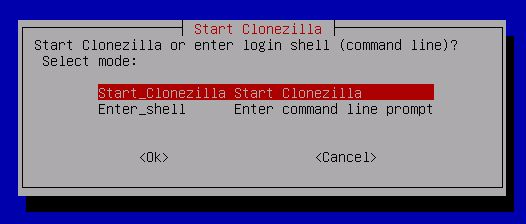
People often get intimidated by the text-based interface, but if you can read a menu, you can use Clonezilla. There’s almost no learning curve if you follow the "Beginner" mode.
- Download the ISO: Grab the stable version from their site.
- Make it Bootable: Use a tool like Rufus or BalenaEtcher to flash the ISO to a USB drive.
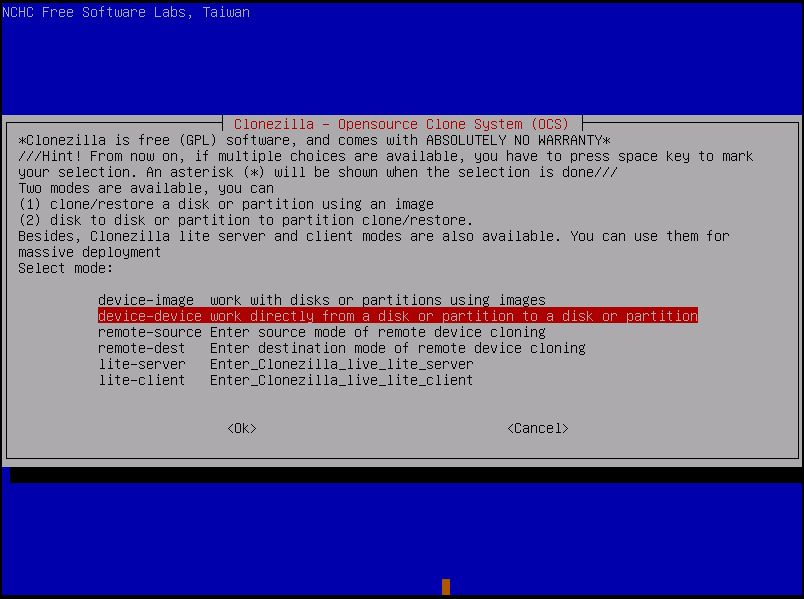
- Boot & Clone: Plug it in, boot from the USB, and follow the "device-device" wizard. 🥳
The Tech Behind the Magic!
For my fellow tech leads and devs, the beauty of Clonezilla is that it only saves and restores used blocks in the hard disk. This makes the cloning process incredibly fast. If you have a 1TB drive but only 100GB is used, Clonezilla doesn't waste time moving the empty space. 🚀
It’s efficient, it's transparent, and it’s been vetted by the global FOSS community for decades. 🗞️
Ready to upgrade your drive?
If you're tired of "bloatware" cloning tools that collect your data and ask for your credit card, Clonezilla is the breath of fresh air you need. It’s the "it just works" solution for anyone who respects their time and their privacy. 🎬
Go ahead and keep that ISO on a dedicated "rescue" USB. You’ll thank me later! 🚀
What's the weirdest partition setup you've ever had to migrate? Let me know in the comments, bro! 🥳
Wait..
Cloning a drive is a high-stakes move. Always, always make a secondary backup of your super-important files before you start moving partitions around. If you found this "simplified" FOSS breakdown helpful, share it with your squad. Let’s save everyone from the "Pro" upgrade trap! 🗞️
Subscribe to our newsletter
Get the latest FOSS gems and hardware hacks delivered right to your inbox. 🗞️